ThinkPad Fan Control


A modern, Linux-native fan control GUI for ThinkPads — the kind of thing Windows users reach for TPFanControl to get, but built for Linux and Wayland.
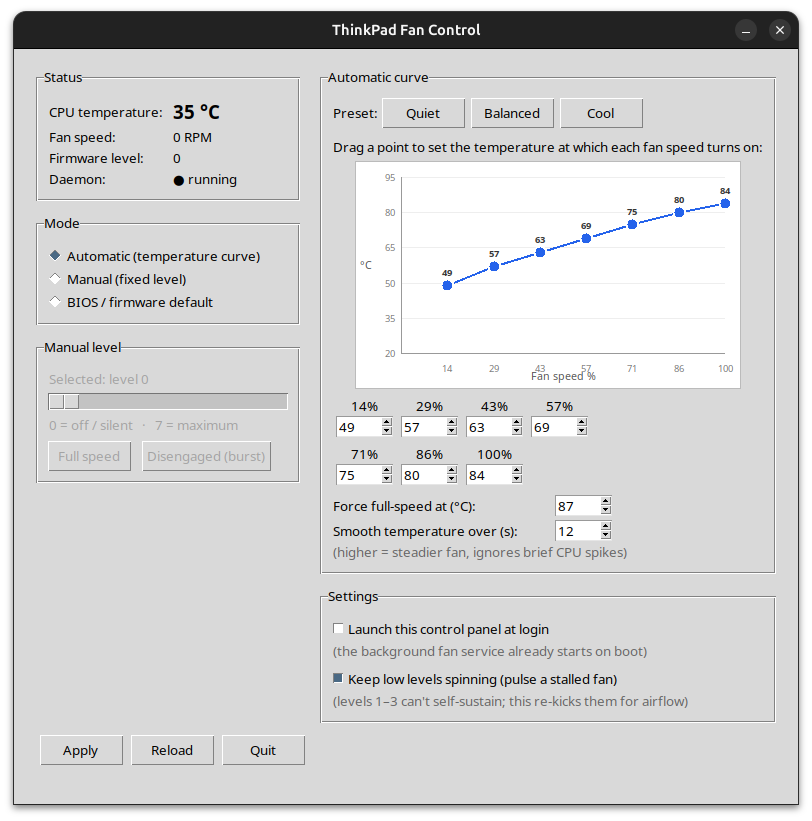
Automatic fan-speed control for ThinkPad laptops on Linux, with a desktop GUI. It gives you what the firmware / GNOME power profiles don’t: automatic temperature-based control across all 8 fan levels, an editable curve you can drag on a graph, and precise manual override. Clean and Wayland-friendly, it works across GNOME, KDE Plasma, and other major desktop environments.
Works on ThinkPads whose fan is controlled by the thinkpad_acpi driver
(/proc/acpi/ibm/fan) — i.e. the large majority of ThinkPads on Linux.
Developed and tested on a ThinkPad L490 (Ubuntu 24.04).
How it works
thinkpad-fand— a small root daemon (systemd service) that is the only writer to/proc/acpi/ibm/fan. It runs the temperature curve and all safety.thinkpad-fan-gui— a Tkinter desktop app (runs as your normal user) to watch temperature/RPM and choose the mode and curve.
The two communicate only through a JSON file (/etc/thinkpad-fan/config.json),
so the GUI never needs root — clean and Wayland-friendly. CPU temperature is read
from coretemp (Intel), k10temp (AMD), or the ThinkPad sensor, so it works on
both Intel and AMD ThinkPads. On NVIDIA-equipped ThinkPads the GPU temperature
is picked up too and gets its own curve - see
NVIDIA GPU support.
The daemon also publishes a read-only snapshot of what it is doing to
/run/thinkpad-fan/status.json, which is what the GUI displays - so the panel
can never disagree with the fan.
Compatibility
Works on any ThinkPad whose fan is driven by thinkpad_acpi. Confirmed reports
below — please add yours in
issue #1.
| Model | Distro / Desktop | /proc/acpi/ibm/fan works? |
Lowest level that keeps spinning | Notes |
|---|---|---|---|---|
| L490 | Ubuntu 24.04 / GNOME (Wayland) | Yes | ≈4 (1–3 stall; re-kick helps) | Developed & tested here |
| P1 Gen7 | Fedora 44 KDE Plasma 6.6.5 Wayland | Yes | lowest working fan level is 1 | tested |
| P1 Gen7 | Pop!_OS / GNOME (Wayland) | Yes | 1 | RTX 4060; NVIDIA GPU support developed & tested here |
Modes
| Mode | Behaviour |
|---|---|
| Automatic | Picks fan level 0–7 from CPU temperature (and NVIDIA GPU temperature, where present) using an editable curve per source, with hysteresis so it doesn’t oscillate. Edit it on an interactive graph (Y = temperature, X = fan speed %) by dragging points, or with the numeric boxes / presets — they stay in sync. |
| Manual | Holds a fixed level you choose (slider 0–7, plus Full speed / Disengaged). |
| BIOS | Hands control back to the firmware (level auto). |
Features
- NVIDIA GPU temperature (optional) - a second source with its own curve and its own critical limit; the fan follows whichever source asks for more cooling. See NVIDIA GPU support.
- Interactive curve graph — drag the dots to set the temperature at which each fan speed turns on; points are kept monotonic automatically.
- Temperature smoothing — the curve reacts to an averaged temperature (default 12 s) so brief CPU turbo spikes don’t surge the fan on and off.
- Stall re-kick (experimental) — on some ThinkPads the lowest fan levels (≈1–3) can’t keep the fan spinning: it spins up, then stalls to 0 RPM. When enabled, the daemon re-issues a stalled level periodically to pulse some airflow. Levels that do sustain (RPM > 0) are never re-kicked, so higher speeds stay perfectly smooth. Tested on the L490; behaviour varies by model.
- Launch at login — optional XDG autostart for the control panel.
- App icon for the menu/dock launcher and window.
NVIDIA GPU support
ThinkPads with a discrete NVIDIA GPU (P1, P16, T-series with dGPU, …) run the GPU as a second, independent temperature source. It is entirely optional: machines without one behave exactly as before.
Developed and tested on a ThinkPad P1 Gen 7 (Intel Core Ultra 7 165H + RTX 4060 Laptop GPU, Pop!_OS), but nothing in it is model-specific.
How CPU and GPU interact
Each source runs its own curve, and the daemon applies whichever asks for more cooling:
fan_level = max(cpu_requested_level, gpu_requested_level)
This is deliberately a maximum of requested levels, not of raw temperatures: 70 C is hot for a CPU and unremarkable for a GPU, so the two need different curves. Hysteresis is tracked per source, so the CPU cooling off never drags the GPU’s request down with it (or vice versa). The GUI shows which sensor won.
How the GPU is detected
Four backends, tried best-first. The one that answers is remembered, so the steady state is a single cheap call:
| Order | Backend | Notes |
|---|---|---|
| 1 | NVML (libnvidia-ml.so.1) |
The driver’s own library, called via ctypes. No extra package, no subprocess. |
| 2 | GPU hwmon | nvidia / nouveau hwmon devices, where the driver exposes one. |
| 3 | ThinkPad EC | The EC’s own GPU-labelled sensor, on models that report it. |
| 4 | nvidia-smi |
Last resort, rate-limited to one spawn per 5 s. |
NVML is opened and closed around each read on purpose. Holding a device handle open pins a hybrid-graphics dGPU awake and stops it ever runtime-suspending; a full open/read/close costs ~15 ms and only ever happens while the GPU is already powered up.
Hybrid graphics, and when the temperature is unavailable
Before touching the driver at all, the daemon checks the NVIDIA card’s PCI
power/runtime_status. A suspended dGPU is left strictly alone: it is
powered down, so it produces no heat and needs no cooling. When something wakes
it, monitoring resumes on the next poll.
A GPU temperature that is missing for any reason - no NVIDIA card, driver not loaded, dGPU asleep, sensor failure, garbage output - simply means that source requests nothing. It can never crash the daemon or disable CPU fan control. A backend that fails is retried after 30 s, which is also how a GPU that comes back (driver reloaded, card woken) is picked up again automatically.
Because readings feed a draining average, a GPU that disappears fades out over the smoothing window rather than holding the fan up on a stale value.
Fans
P1/P16-class ThinkPads have two fans with separate tachometers
(fan1_input, fan2_input) but a single shared EC fan level. Both RPMs are
read and displayed; control stays on the one /proc/acpi/ibm/fan level, because
that is all the interface exposes. No attempt is made to drive the fans
independently.
Configuration
Added to /etc/thinkpad-fan/config.json. Existing config files keep working
untouched - any key that is absent simply takes its default:
| Key | Default | Meaning |
|---|---|---|
gpu_monitoring |
"auto" |
auto = use the GPU if present; on = same, but log when missing; off = never look at it |
gpu_curve |
see below | [temp, level] pairs, same shape as curve |
gpu_critical_temp |
90 |
Force full-speed at/above this. Clamped to 60-95 C, like critical_temp is clamped to 60-90 C |
The default GPU curve starts cooling around 60 C and ramps hard past 80 C:
"gpu_curve": [[0,0],[60,1],[65,2],[70,3],[74,4],[78,5],[82,6],[85,7]]
hysteresis, smoothing_seconds and poll_interval are shared by both sources.
In the GUI the Automatic curve panel has a CPU tab and a GPU (NVIDIA) tab, each with its own presets, draggable graph, numeric boxes and force-full-speed limit.
Safety (built in, cannot be disabled)
- Critical-temperature override — above your configured limit (default 87 °C, hard cap 90 °C) the fan is forced to full speed regardless of mode. This is what makes the user-editable config safe.
- GPU critical override — the same for the GPU, with its own limit (default 90 °C, hard cap 95 °C). A hot GPU forces full speed exactly like a hot CPU does. GPU monitoring is additive: it can only ever ask for more cooling, so it cannot weaken any existing CPU protection.
- Hardware watchdog — re-armed every loop. If the daemon ever crashes, the firmware resumes automatic cooling within ~15 s; the fan can’t get stuck off.
- Read-back / re-assert — the daemon reads the firmware’s actual level back and only rewrites when it has drifted, so it never thrashes the fan.
- Graceful stop — stopping the service restores firmware
auto. - The daemon validates and clamps everything it reads from the config.
Install
Option A — Debian package (Ubuntu / Debian / Mint / Pop!_OS)
Download thinkpad-fan-control_1.0.0_all.deb from the
Releases
page, then:
sudo apt install ./thinkpad-fan-control_1.0.0_all.deb
Option B — from source
git clone https://github.com/Swmarakis/thinkpad-fan-control.git
cd thinkpad-fan-control
sudo ./install.sh
Either way, the installer enables fan control (thinkpad_acpi fan_control=1),
starts the background service, and adds a “ThinkPad Fan Control” launcher.
If /proc/acpi/ibm/fan was just made writable, a reboot may be needed once.
Useful commands
systemctl status thinkpad-fand      # service state
journalctl -u thinkpad-fand -f      # live log of the levels it sets
sudo thinkpad-fand --dry-run        # print decisions without touching the fan
cat /run/thinkpad-fan/status.json   # what the daemon currently sees and decided
Checking every sensor at once:
# CPU temp, GPU temp, both fan RPMs, the selected level and the sensor that
# asked for it - straight from the daemon:
python3 -m json.tool /run/thinkpad-fan/status.json

# The same figures read directly from the hardware:
nvidia-smi --query-gpu=temperature.gpu --format=csv,noheader   # GPU
cat /sys/class/hwmon/hwmon*/fan[12]_input                      # both fans
grep -E "level|speed" /proc/acpi/ibm/fan                       # EC level
Uninstall
sudo apt remove thinkpad-fan-control     # if installed via .deb
# or, if installed from source:
sudo ./uninstall.sh
Notes
- Disengaged removes the fan’s speed cap for maximum airflow — for short bursts, not sustained use.
- Fan levels are firmware-defined and not linear; on some models the lowest levels barely spin the fan. For steady airflow use a level that actually sustains (often ≈4+), or enable the stall re-kick for intermittent airflow.
Repository layout
src/        the daemon (thinkpad-fand) and GUI (thinkpad-fan-gui)
data/       files the installer ships: systemd unit, .desktop, default config, icons
packaging/  build-deb.sh (creates the release .deb) and the icon generator
tests/      unit tests (stdlib unittest; the GPU is mocked, no hardware needed)
install.sh  / uninstall.sh   install from source
docs/       screenshot
Run the tests with:
python3 -m unittest discover -s tests -v
To produce the .deb for a release: packaging/build-deb.sh
(output: build/thinkpad-fan-control_<ver>_all.deb).
License
MIT — see LICENSE.